Notification Template
1. Introduction
The Notification Template Setting is a feature that enables you to customize notification templates for SMS and email messages within your system. This documentation provides a step-by-step guide on how to configure and adjust your notification templates to suit your needs.
Configuring Notification Templates
In the Notification Template Setting, you can adjust the following aspects of your notification templates:
1. SMS Template
Body
- Customize the body content of SMS messages.
- Insert relevant information and messages for your SMS notifications.
Tags
- Select specific tags to categorize SMS templates.
- Tags help you organize and locate templates easily.
2. Email Template
Subject
- Set the subject line for email notifications.
- Craft a subject that reflects the content and purpose of the email.
Body
- Customize the body content of email messages.
- Include the information and messages relevant to your email notifications.
Tags
- Choose specific tags to label and categorize email templates.
- Tags facilitate organization and management of email templates.
Saving Template Changes
After making adjustments to your notification templates, don't forget to save your changes to ensure they take effect. Most systems will have a "Save" button to confirm your modifications.
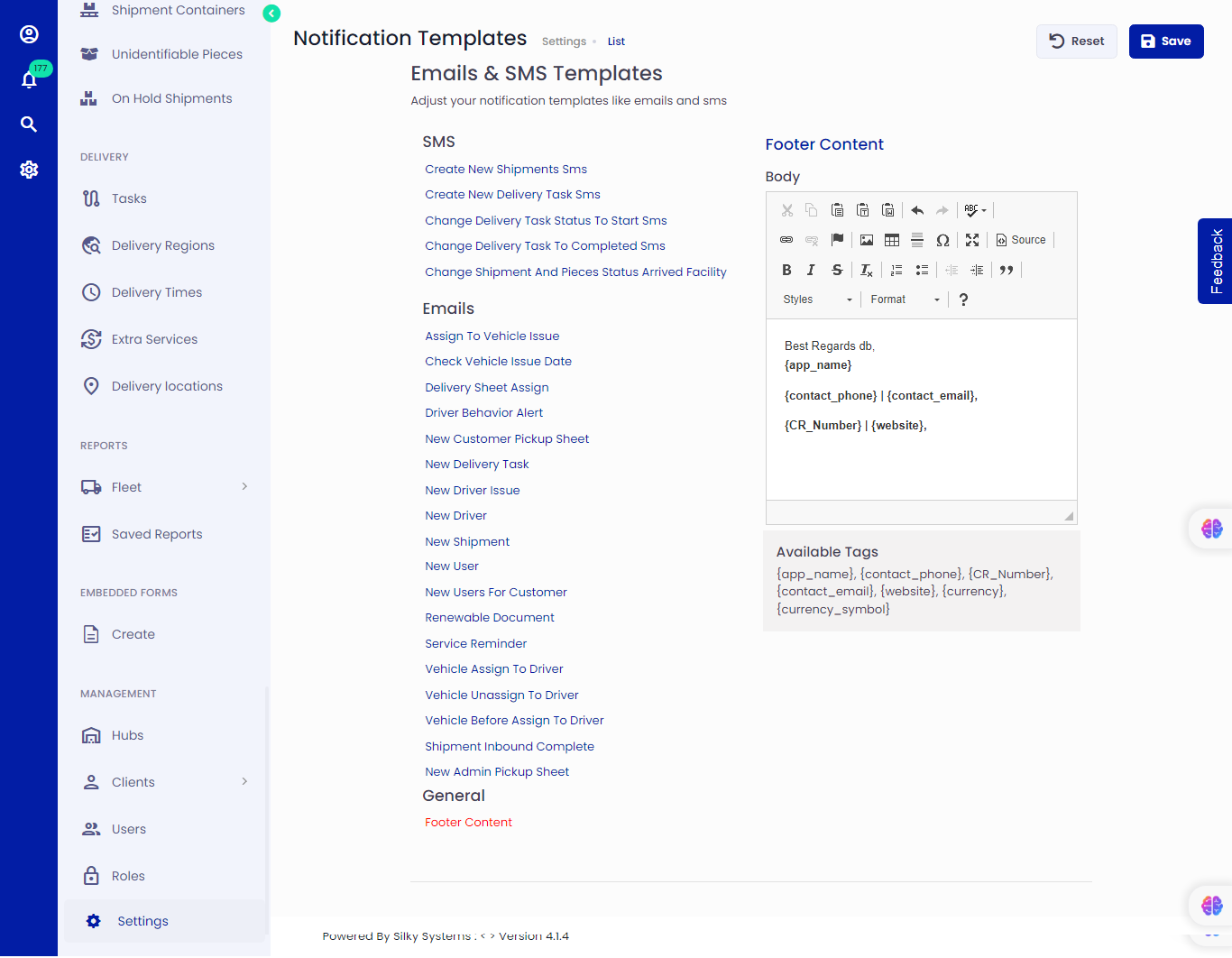 Figure.01 Notification Template
Conclusion
The Notification Template Setting allows you to tailor SMS and email templates to align with your communication needs. By following the steps outlined in this documentation, you can effectively configure your notification templates for your system or application.